Quick reference guide

Watch a run and read its timeline

By the end you will be able to tell exactly which step a run is on, how long it has taken, and what it is waiting for.
About 4 minutes

Before you start

The steps

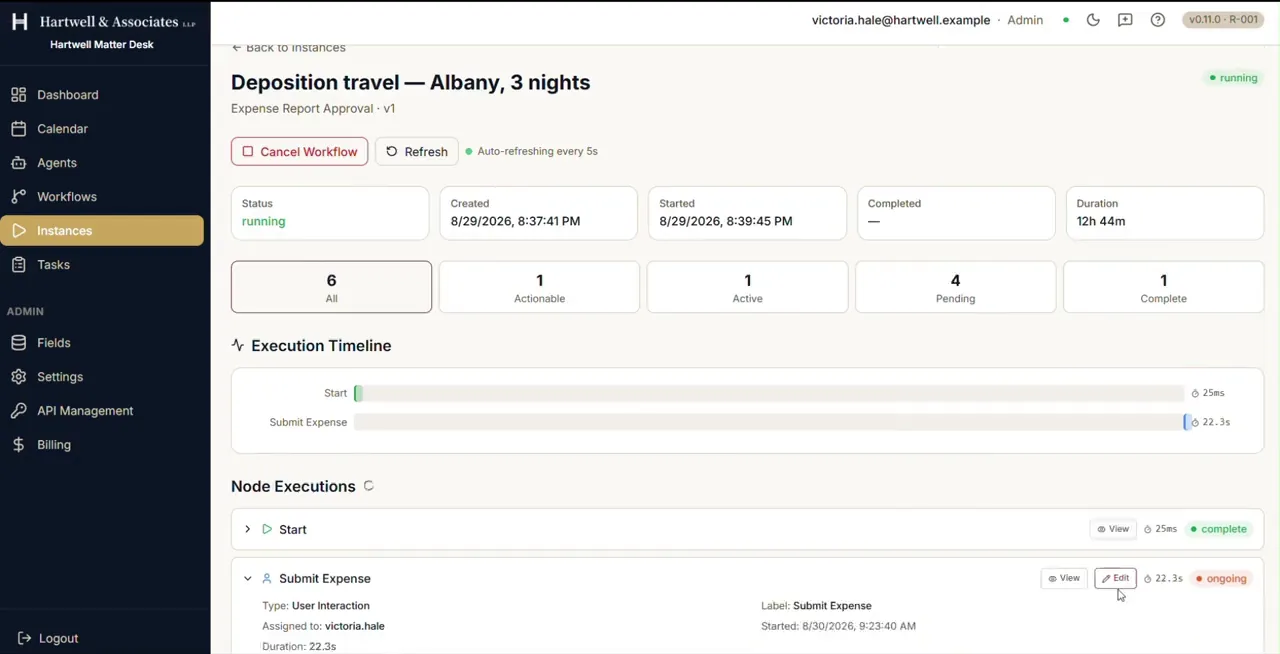
The detail view of a running workflow instance of Expense Report Approval. Tiles show its status as running, when it was created and started, an empty completed field and a duration of twelve hours and forty three minutes. Counters below read six steps in all, one actionable, one active, four pending and one complete. Under them an execution timeline plots Start and Submit Expense with the time each took, over a Node Executions list showing Start complete and Submit Expense ongoing.

A running instance, with its timings, counters and per-node state. Demo workspace with example data.

Where to go next

Adapted from the in-product help centre, which stays the fuller reference. For how to raise anything this guide does not cover, see the Support Hub.

Watch a Workflow Run in Dave: A Quick Reference Guide | Dave